

CCTV camera installation — Residential & Commercial
CCTV Camera Installation and Repairs
CCTV camera installation - HD and IP camera systems designed and installed across Johannesburg. Remote smartphone viewing, night vision, motion alerts, DVR/NVR recording. 4-camera systems from R350. Existing system repairs same-day. 18 years experience. Free site assessment.
Call For a Free Quote
061 402 6299
Request a Callback
CCTV Camera Installation and Repairs FULL SERVICE LIST
CCTV Camera Installation and Repair Services We Offer
We provide professional CCTV camera installation and CCTV camera repairs for residential, commercial, industrial and estate properties across Gauteng. Our technicians install, repair and maintain CCTV surveillance systems designed to improve security, monitor activity and protect homes and businesses.
CCTV Camera Installation
We install complete CCTV camera systems for homes, offices, warehouses, complexes, schools and commercial properties. Our installations include indoor cameras, outdoor cameras, wireless CCTV systems and high-definition surveillance systems.
All CCTV camera installations are professionally configured for reliable security monitoring and remote viewing access.
CCTV Camera Repairs
We repair CCTV cameras that stop working, lose video signal, display blurry images or fail after storms and load shedding. Common problems include damaged power supplies, faulty connectors, DVR issues and camera failures.
Our technicians diagnose and repair CCTV system faults quickly to restore security coverage.
CCTV Camera Remote Viewing Setup
We configure CCTV camera remote viewing systems that allow property owners to monitor cameras from smartphones, tablets and computers. We setup mobile apps, internet connections and remote access settings for convenient surveillance monitoring.
We also repair remote viewing connection problems and app configuration issues.
Cable & Power Repairs
Damaged cables and faulty power supplies are common causes of CCTV camera failure. We repair CCTV cabling, replace damaged connectors and fix power supply issues affecting camera operation.
We also repair CCTV systems damaged by lightning and load shedding power surges.
Night Vision CCTV Camera Repairs
We repair CCTV cameras with faulty infrared night vision systems, poor low-light visibility and image quality problems. Night vision cameras are essential for 24-hour property surveillance and perimeter monitoring.
Our technicians restore clear nighttime recording and security performance.
CCTV Camera Remote Viewing Setup
We configure CCTV camera remote viewing systems that allow property owners to monitor cameras from smartphones, tablets and computers. We setup mobile apps, internet connections and remote access settings for convenient surveillance monitoring.
We also repair remote viewing connection problems and app configuration issues.
Camera Types
CCTV Camera Types — Which Is Right for You?
We design and install the right camera for each location. Here is what each type does and where it works best.
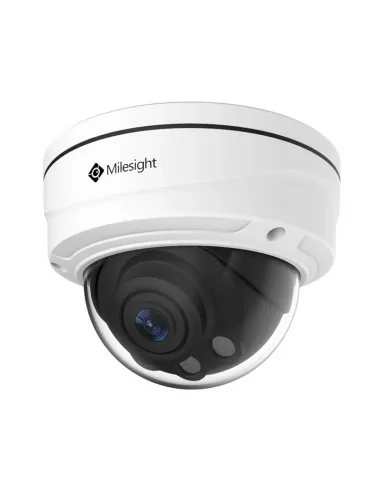
Dome Camera
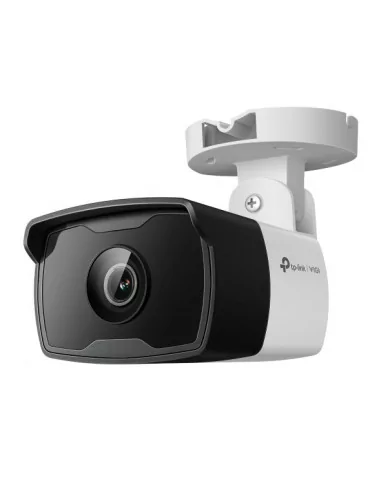
Bullet Camera
Cylindrical, directional camera mounted on walls or ceilings. Highly visible acts as a strong deterrent. Excellent long-range performance and typically equipped with more powerful IR night vision than dome cameras. The go-to choice for Johannesburg driveways and gate entrances.
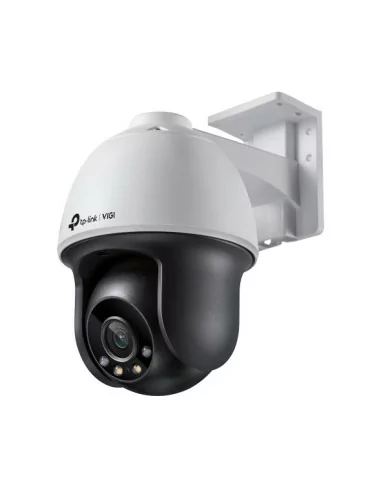
PTZ Camera
Pan-Tilt-Zoom camera that can rotate 360° horizontally, tilt vertically, and zoom optically. Can be controlled remotely to follow a target. Ideal for covering large open areas with a single camera. Higher cost but far greater coverage. Used on commercial and estate perimeters.
Technology Guide
HD CCTV vs IP Cameras — What's the Difference?
We design and install the right camera for each location. Here is what each type does and where it works best
HD CCTV Cameras
- Runs on existing coaxial cable no rewiring needed on upgrades
- Lower cost per camera and DVR recorder
- Highly reliable simple, proven technology
- 1080p (2MP) to 5MP resolution sufficient for most homes
- Remote viewing available via DVR app (Hik-Connect, DMSS, XMEye)
- Lower maximum resolution than IP (capped at ~5MP on most systems)
- Limited intelligent features (no face detection, basic motion only)
IP / Network Cameras
- 4MP, 8MP (4K) and beyond significantly more detail
- Smart features: facial recognition, LPR, perimeter intrusion detection
- PoE (Power over Ethernet) one cable for power and video
- Easier to scale add cameras to existing network infrastructure
- Runs on ethernet cable (Cat5e/Cat6) may require new cabling
- Higher upfront cost per camera and NVR recorder
- More complex configuration requires network setup knowledge
Paskwa Gate Repairs recommendation:
For most Johannesburg residential homes, HD CCTV at 1080p–4MP is the best value. For commercial properties, estates with vehicle access, or homeowners who want 4K clarity and smart features, we recommend IP cameras. We install both call 061 402 6299 and we will advise on your specific situation
Most Asked About Feature
How to View Your CCTV on Your Phone — Complete Guide
Remote smartphone viewing is the most searched CCTV feature in Johannesburg and the content no competitor explains properly.
Remote viewing allows you to watch your CCTV cameras live from anywhere in the world using your smartphone, tablet or PC. It also lets you review recorded footage, receive motion alerts, and control PTZ cameras all from your phone. Paskwa Gate Repairs sets up remote viewing as part of every installation. Here is how it works:
Connect DVR/NVR to Router
The recorder must be connected to your internet router via an ethernet cable. This gives the recorder an internet connection so it can be accessed remotely. Wi-Fi connection is not recommended use a wired ethernet connection for reliability.
Required: Ethernet cable · Router with internet
Configure DDNS or P2P
We configure either a DDNS (Dynamic DNS) address — a fixed web address that always points to your recorder — or P2P (Peer-to-Peer) cloud access using the recorder's unique serial number. P2P is simpler to set up; DDNS gives more control and is better for commercial use.
Hikvision: P2P via Hik-Connect · Dahua: DMSS app · Generic: XMEye app
Install the App
Download the correct app for your recorder brand from the App Store or Google Play. Hikvision recorders use Hik-Connect. Dahua recorders use DMSS. Generic recorders typically use XMEye or CMS. We install the correct app on your phone and configure it during the installation.
iOS and Android · Hik-Connect · DMSS · XMEye · CMS
Add Device and Test
We add your recorder to the app using its P2P code or DDNS address, set your username and password, and test live view, playback, and motion detection alerts on your phone before we leave. You walk away with everything working and the app configured on your device.
Live view · Playback · Motion alerts · Works on 4G/5G & Wi-Fi
Already have a CCTV system but can't view it on your phone?
We set up remote viewing on existing CCTV systems across Johannesburg for R450–R900. This includes connecting the recorder to your router, configuring DDNS or P2P access, installing the app on up to 3 devices, and testing that everything works before we leave. Call 061 402 6299 to book.
Load Shedding and CCTV
Does Your CCTV Keep Recording During Load Shedding?
Most Johannesburg homeowners discover their cameras go offline during outages here is what to do about it.
A standard CCTV installation has no power backup when the electricity goes off during load shedding, the DVR recorder and cameras switch off immediately. This means your property has no camera coverage during exactly the time criminals often target homes in Johannesburg when the electric fence is also down and the gate motor is on battery.
The solution is a UPS (Uninterruptible Power Supply) connected to your DVR and cameras. A correctly sized UPS keeps your entire CCTV system recording for 2–8 hours during a load shedding outage depending on the number of cameras and the UPS battery size. We supply and install UPS units for CCTV systems as a standalone upgrade or as part of a new installation.
CCTV goes off during load shedding? We can fix that - Call 061 402 6299
A UPS backup for a 4-camera system costs R1,800–R2,800 fully installed. For an 8-camera system, R2,500–R4,500. The UPS switches to battery power within milliseconds the cameras never skip a frame during the transition. Ask us to include a UPS in your installation quote.
Load shedding also damages CCTV equipment:
DVR/NVR power supply failure — The voltage surge when power is restored can fry the power supply unit inside your recorder. DVR power supply replacement: R450–R900.
Hard drive corruption — Sudden power cuts while the hard drive is writing can corrupt the file system. If your recorder is not showing footage, the hard drive may need to be replaced: R800–R2,200.
Camera image sensor damage — Power surges on restoration can damage image sensors in cameras. If a camera shows a white, black or distorted image after load shedding, the sensor is likely damaged: R450–R1,800 to replace the camera.
Surge protection — Install a surge protector on the DVR's power supply input for R350–R600. Significantly reduces the risk of surge damage on power restoration.
Troubleshooting Guide
What's Wrong With My CCTV System?
Match your symptom to find the likely cause and what we will do to fix it. Call 061 402 6299 to book a same-day technician.
- Camera shows no image (black screen)
- Likely Cause
- Camera power failure, cable fault or dead camera
- Fix / Action
- Cable test / camera replace — R450–R1,800
- Camera image is blurry or out of focus
- Likely Cause
- Lens dirty, moisture ingress or lens damaged
- Fix / Action
- Clean / replace lens — R350–R900
- No night vision dark image at night
- Likely Cause
- IR LEDs failed or IR cut filter stuck
- Fix / Action
- Camera replace — R450–R1,400
- DVR shows no footage on playback
- Likely Cause
- Hard drive full, failed, or not recording
- Fix / Action
- HDD replace / format — R800–R2,200
- DVR screen no image (no signal)
- Likely Cause
- DVR power supply failure or failed DVR unit
- Fix / Action
- PSU / DVR replace — R450–R4,500
- Can't connect on phone (remote viewing)
- Likely Cause
- DDNS / P2P config lost, router change or app issue
- Fix / Action
- Remote viewing setup — R450–R900
- Camera image has lines / interference
- Likely Cause
- Cable damaged, loose BNC connector or interference
- Fix / Action
- Cable repair / replace — R500–R1,400
- Camera image washed out / overexposed
- Likely Cause
- Camera pointed at bright light or WDR setting incorrect
- Fix / Action
- Reposition / reconfigure — R350–R700
- DVR date/time resets constantly
- Likely Cause
- Cut or pulled wire — criminal damage
- Fix / Action
- Wire replacement — R650–R1,800 per zone
Positioning Guide
Where to Place CCTV Cameras — Johannesburg Home Guide
Correct camera placement is as important as the cameras themselves. Here is where we recommend cameras for a typical Johannesburg residential property.
Driveway / Gate Entry
The single most important camera position. A bullet camera facing the entry gate captures all vehicle and pedestrian access. Mount at 2.5–3m height, angled down slightly to capture faces and licence plates. Use a camera with strong IR for night-time plate visibility.
Front Door / Entrance
Covers the main entry point. Positioned to capture the face of anyone approaching the door — critical for identifying persons of interest after a security incident. Mount at face height (2–2.5m) and ensure no backlight from windows or sunlight behind the subject.
Back Door / Servants Entrance
Often overlooked but statistically the most common entry point in Johannesburg residential break-ins. A camera covering the back door and back yard access point is essential. A wide-angle bullet or fisheye camera can cover a large back yard area with a single unit.
Perimeter Corners
Two cameras positioned on diagonally opposite corners of the property cover the full perimeter walls from two directions, eliminating blind spots. Each camera covers two walls simultaneously. Use cameras with wide-angle lenses and sufficient IR range for the wall length.
Garage and Carport
Covers vehicle theft and garage break-ins. A dome camera mounted on the ceiling of the garage covers vehicles and the garage door. Particularly important if the garage has an internal door connecting to the house a common vulnerability in Johannesburg properties.
Pool / Entertainment Area
Often a security blind spot. A camera covering the pool and entertainment area also covers any back wall access point. Important for properties with domestic employees or frequent entertainment guests. Also provides safety monitoring for families with children.
Customer Reviews
What Our Customers Say

“Excellent installation. The team did a neat job running cables, positioned the cameras exactly where I wanted them, and set up remote viewing on my phone before they left. I can now watch my property live from anywhere. Very impressed.” David M
"My DVR stopped recording after load shedding. Paskwa Gate Repairs came out the next morning, replaced the hard drive and set everything back up. They also installed a UPS so it won't happen again. Fast, professional and honest pricing.” Ntombi P.
"We had a 4-camera system that I could never get to work on my phone. Repairs Plus came out for R550, spent an hour configuring our DVR and app, and I can now view everything on my phone and tablet. Should have called them sooner. Andre S.
FAQs
Frequently Asked Questions CCTV installation Johannesburg
HOW MUCH DOES CCTV INSTALLATION COST IN JOHANNESBURG?
CCTV installation costs R3,500–R5,500 for a fully installed 4-camera HD system and R6,500–R11,000 for an 8-camera system. Prices include cameras, DVR recorder, cabling, power supply, remote viewing setup and 1-year support. Commercial systems start from R14,000. We provide free site assessments and detailed quotations — call 061 402 6299
HOW DO I VIEW MY CCTV CAMERAS ON MY PHONE?
Remote smartphone viewing requires your DVR/NVR to be connected to your router via ethernet, then configured with a P2P cloud code or DDNS address. You install the manufacturer app (Hik-Connect for Hikvision, DMSS for Dahua, XMEye for generic brands) and add your recorder. Repairs Plus sets this up as part of every installation. For existing systems, we offer remote viewing configuration for R450–R900..
WHAT IS THE DIFFERENCE BETWEEN HD CCTV AND IP CAMERAS?
HD CCTV cameras run on coaxial cable to a DVR recorder. They offer 1080p–5MP resolution, are cost-effective and reliable — ideal for most homes. IP cameras run on ethernet cable to an NVR recorder, offer 4MP–4K resolution and smart features like face detection and licence plate recognition, but cost more. We install both — call us and we will recommend the best option for your budget and requirements.
HOW MANY CAMERAS DO I NEED FOR MY HOME?
A standard Johannesburg residential home typically needs 4–8 cameras: driveway/gate entry (1–2), front door (1), back door (1), garage (1), and perimeter corners (2–3). The exact number depends on your property layout and budget. We carry out a free site assessment and recommend optimal positions specifically for your property.
DOES CCTV KEEP WORKING DURING LOAD SHEDDING?
Not by default — standard CCTV systems switch off when the power goes out. The solution is a UPS (Uninterruptible Power Supply) connected to your DVR and cameras, which keeps the system running for 2–8 hours during an outage. UPS installation costs R1,800–R4,500 depending on system size. We recommend including a UPS in every Johannesburg CCTV installation.
HOW LONG DOES CCTV FOOTAGE STAY ON THE RECORDER?
Retention depends on hard drive size, number of cameras, resolution and recording mode. A 1TB drive with 4 cameras at 1080p on motion recording typically stores 30–60 days. A 2TB drive with 8 cameras stores 30–45 days. We install systems with 1TB–8TB drives. You can always add a larger drive later if you need longer retention.
MY CCTV STOPPED WORKING AFTER LOAD SHEDDING — WHAT HAPPENED?
Two common causes: the DVR power supply was damaged by the voltage surge when power returned (replace for R450–R900), or the hard drive was corrupted by the sudden power cut while it was writing (replace for R800–R2,200). We diagnose and repair both same-day.
Have a different Question?
Get In Touch
Get Your CCTV Installed or Repaired Today
Free site assessments. HD and IP systems. Remote viewing included. Same-day repairs across all of Johannesburg and Gauteng.
- 061 402 6299 — Call or WhatsApp
- info@paskwagaterepairs.co.za
- 7 Poplar Avenue, Broadacres, Sandton, 2021
- Mon–Fri: 07:00–18:00 | Sat - Sun: 07:00–14:00
- 24/7 Emergency Line available
Book a Free Quote
Where We Work
CCTV Installation Across All of Johannesburg
New installations, repairs, upgrades and remote viewing setup across all of Johannesburg and wider Gauteng.
- Alberton
- Douglasdale
- inanda
- Morningside
- Saxonwold
- Bedfordview
- East Rand
- Johannesburg
- Randburg
- Benoni
- Boksburg
- Edenvale
- Kyalami
- Roodepoort
- Bryanston
- Brakpan
- Fourways
- Melrose Arch
- Rosebank
- Centurion
- Hyde Park
- Midrand
- Sandton
Not listed? We cover all of Gauteng — call 061 402 6299 to confirm availability for your area.