

CCTV Installers Brakpan · Residential · Commercial · Estate · Same-Day Repairs
CCTV installation Brakpan
Professional CCTV installation Brakpan for homes, estates, and businesses across Dalpark, Brenthurst, Sonneveld, Withok, Kenleaf, Minnebron, and all East Rand suburbs. HD and IP security cameras Brakpan. Remote smartphone viewing. Night vision. UPS power backup. Installations by appointment. 18 years experience.
Call For a Free Quote
061 402 6299
Request a Callback
The Paskwa Advantage
CCTV That Works With Your Gate, Intercom & Electric Fence — Brakpan
Most CCTV installers Brakpan only fit cameras. Paskwa Gate Repairs has installed and serviced gate motors, garage doors, intercoms, and electric fencing across Gauteng since 2008 — so your CCTV installation Brakpan can be designed to work *with* the security you already have, by a team that already understands it. This is the single biggest difference between us and a camera-only installer, and it matters more than most homeowners realise.
Gate & boom-gate cameras for Brakpan
A licence-plate-recognition (LPR) camera tied to your existing gate motor records every open and close event and captures each number plate arriving at the entrance — the single most useful camera on most Brakpan properties. Because we also service gate motors, the same technician sets up the camera and the gate trigger together, so the camera records automatically whenever the gate is operated.
Intercom & Video at the Gate
See exactly who is at the gate on the same phone app as your cameras. We integrate your Brakpan CCTV with your existing intercom and access control, so you can answer the gate, view the camera, and let someone in from anywhere — at work, on holiday, or simply from the couch. For properties without an intercom, we can add a video doorbell or gate station that feeds into the same system.
Electric Fence Coverage
An electric fence tells you that the perimeter has been breached; a camera tells you who did it, where, and when. We position cameras to cover your fence-line zones so that any breach is recorded with usable footage — and because we install and repair electric fencing too, the fence, the gate, and the security cameras Brakpan properties depend on are all maintained by one trusted company on one call-out.
Full CCTV Service List
CCTV Installation Brakpan — Complete Service Offering
Paskwa Gate Repairs provides professional CCTV installation Brakpan and CCTV repairs Brakpan for residential homes, security estates, townhouse complexes, office parks, warehouses, and commercial properties across Brakpan and the surrounding East Rand area. Whatever your property needs, every job starts with a free on-site assessment.
CCTV Camera Installation
We design and install complete CCTV camera installation Brakpan systems from scratch — free on-site assessment, correct camera positioning for your specific property, full cabling, DVR or NVR configuration, and remote viewing set up on your phone before we leave. Security cameras Brakpan installed right the first time
CCTV Camera Repairs
Black screen, signal loss, no night vision, DVR failures, hard-drive corruption, lost remote viewing — we repair all makes of CCTV Brakpan. As we are Broadacres-based, repairs here are by arrangement; for a same-hour emergency a local operator may be closer, and we will say so honestly.
CCTV Camera Remote Viewing Setup
Already have security cameras Brakpan but cannot view them on your phone? We configure existing CCTV systems for remote smartphone access (R450–R900), including app installation on up to three devices and full on-site testing. Your CCTV Brakpan system should work on your phone — if it does not, call us.
Estate & Complex CCTV Installation Brakpan
We design and install estate CCTV Brakpan systems including boom-gate cameras with licence-plate recognition (LPR), perimeter wall cameras, guardhouse monitor setups, and integration with existing intercom and access control. CCTV installers Brakpan for security estates and complexes.
UPS & Power Backup — CCTV Brakpan
A power cut shuts down a standard CCTV installation Brakpan immediately. We supply and install correctly sized UPS units that keep your security cameras Brakpan and recorder running for 2–8 hours through an outage, plus surge protection — and we repair CCTV Brakpan equipment damaged by power surges
CCTV System Upgrades Brakpan
Old blurry cameras giving you grainy footage? We upgrade your existing CCTV Brakpan system to HD or IP cameras — often reusing your existing coaxial cable runs to save on recabling cost. Many Brakpan homes go from outdated analogue to crisp 5MP HD in a single day.
What to Expect — Your Brakpan CCTV Installation Step by Step
We keep the process simple and transparent, so you know exactly what happens from your first call to the day the system is handed over. A typical Brakpan CCTV installation runs like this:
- 1. Free site assessment. We visit your Brakpan property, walk it with you, identify the entry points and blind spots, discuss your concerns and budget, and recommend a camera layout and system type.
- 2. Written, itemised quotation. You receive a clear quote that lists the cameras, recorder, cabling, hard drive, power supply, and labour — nothing hidden, nothing to add later.
- 3. Booking and scheduling. Once you approve the quote we book a date. We schedule Brakpan installations so the job gets a proper, unhurried fitting.
- 4. Installation day. Our technician mounts and aims the cameras, runs and conceals the cabling neatly, installs the recorder and power supply, and connects everything. A standard four-to-six camera home install is usually completed in a single day.
- 5. Configuration and tuning. We set up recording, tune the AcuSense detection zones so alerts are meaningful, and label the cameras so playback is easy.
- 6. Phone setup and handover. We configure remote viewing on your phone, run a live test together, show you how to play back footage and respond to alerts, and answer your questions before we leave.
- 7. Aftercare. Your installation carries a one-year workmanship warranty, and we are a phone call away for support, additions, or a fault.
Camera Types
CCTV Camera Types for Brakpan Properties — Which Is Right for You?
Choosing the right camera for each position matters more than the headline megapixel number. A good CCTV installation Brakpan mixes camera types so each spot does its job — identify a face, read a number plate, or simply cover a wide area. Here are the camera types we install and where each one earns its place on a Brakpan property.
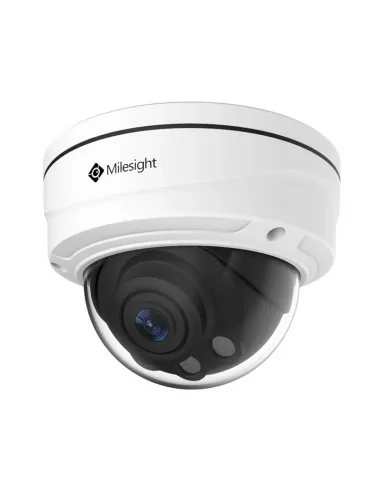
Dome Camera — CCTV Brakpan Entrances
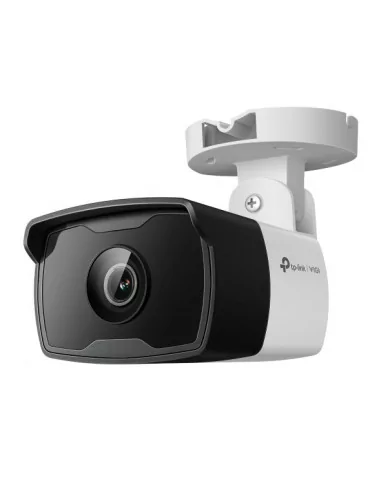
Bullet Camera — CCTV Brakpan Driveways
Ceiling-mounted and vandal-resistant with a discreet housing — the direction of view is not obvious, which is a deterrent in itself. Ideal for front doors, garages, and covered verandas as part of a CCTV camera installation Brakpan for residential properties.
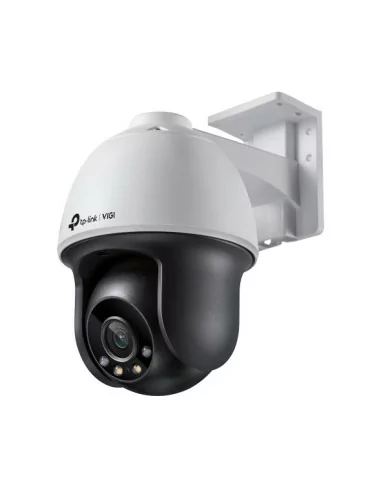
PTZ Camera — Estate CCTV Brakpan
Pan-Tilt-Zoom, remotely controlled from your smartphone. One PTZ camera can cover the work of 3–5 fixed security cameras Brakpan on a large estate or commercial property. Standard in estate CCTV Brakpan installations across Dainfern and Fourways.
Technology Guide
HD CCTV vs IP Cameras — Which Should You Choose in Brakpan?
Two technologies dominate CCTV installation Brakpan today, and choosing between them is the biggest decision in your system. As your professional CCTV installers Brakpan, here is our honest comparison — neither is "better"; they suit different properties and budgets.
HD CCTV Cameras
- Runs on existing coaxial cable no rewiring needed on upgrades
- Lower cost per camera and DVR recorder
- Highly reliable simple, proven technology
- 1080p (2MP) to 5MP resolution sufficient for most homes
- Remote viewing available via DVR app (Hik-Connect, DMSS, XMEye)
- Lower maximum resolution than IP (capped at ~5MP on most systems)
- Limited intelligent features (no face detection, basic motion only)
IP / Network Cameras
- 4MP, 8MP (4K) and beyond significantly more detail
- Smart features: facial recognition, LPR, perimeter intrusion detection
- PoE (Power over Ethernet) one cable for power and video
- Easier to scale add cameras to existing network infrastructure
- Runs on ethernet cable (Cat5e/Cat6) may require new cabling
- Higher upfront cost per camera and NVR recorder
- More complex configuration requires network setup knowledge
Our honest recommendation for Brakpan: for most residential homes, HD at 1080p–4MP delivers the best value, gives clear identification at the gate and doors, and can often reuse existing cabling on an upgrade. For estates, larger homes, commercial properties, or anyone who wants 4K detail and genuine AI detection, IP is the right investment. Many Brakpan properties end up with a sensible hybrid, and we will design the mix around your priorities and budget.
Smart CCTV
Wired vs Wireless (WiFi) CCTV in Brakpan
Homeowners often ask whether a wireless WiFi system is the easier option for their Brakpan CCTV installation. WiFi cameras have their place — a single camera covering a specific spot, a rented home where cabling is not allowed, or a quick temporary setup — but for a permanent whole-property system we almost always recommend a wired installation, and here is why.
A wired system (whether HD coaxial or IP over Cat6) carries both power and video reliably down a cable that cannot be jammed, does not drop off the network, and does not depend on your WiFi reaching the far corner of the garden. WiFi cameras compete with every other device on your network, lose signal through walls and over distance, and still need a power source at each camera — so the "wireless" convenience is often less than it appears. For the gate, perimeter, and any camera that matters for evidence, wired is the dependable choice on a Brakpan property.
Where WiFi cameras genuinely suit a job, we install quality units (such as Hikvision and IMOU WiFi ranges) and set them up properly. But for the core of your Brakpan system, a professionally cabled installation is what delivers footage you can rely on, night after night.
DVR vs NVR & How Long Footage Is Kept — Brakpan
The recorder is the heart of your system. A DVR records HD coaxial cameras; an NVR records IP cameras over the network and unlocks the smart features. Both let you view live and play back footage on your phone, and both come in 4-, 8-, and 16-channel versions so the system can grow.
DVR — for HD coaxial cameras
Connects to HD cameras over coaxial cable, is cost-effective and reliable, and can often reuse existing cabling when upgrading an older Brakpan system. Apps: Hik-Connect (Hikvision), DMSS (Dahua), or XMEye (generic).
NVR — for IP cameras
Connects to IP cameras over the network, supports 4MP, 4K, and higher resolutions, and a PoE NVR powers the cameras directly down the Cat6 cable. NVRs unlock smart detection — AcuSense, facial recognition, LPR, and intrusion lines.
Hard-drive sizing — how long will footage be retained?
Retention depends on the drive size, the number of cameras, the resolution, and the recording mode. We always configure motion-detection recording rather than continuous recording, which dramatically extends how far back you can go. The table below is a realistic guide for a Brakpan system; drives can be upgraded at any time to extend storage.
Smart CCTV
Hikvision AcuSense AI & ColorVu — Smarter Security Cameras Brakpan
The biggest upgrade in CCTV installation Brakpan over the last few years is not resolution — it is intelligence. Modern Hikvision and Dahua cameras can tell a person from a passing car and record in full colour at night. As experienced Hikvision installers Brakpan, we configure these features so they actually work for your property, instead of leaving them on the factory defaults that flood your phone with useless alerts.
AcuSense AI — Human & Vehicle Detection
Standard motion alerts fire for every cat, moth, and moving shadow until you switch them off in frustration — and then the system is recording but never warning you. Hikvision AcuSense (and Dahua SMD) runs deep-learning AI on the camera itself, classifying each detection as a person, a vehicle, or background movement. Your phone only alerts when a real person or vehicle enters your property, which means far fewer false alarms and a far faster response when it genuinely matters. Tuned properly, it cuts nuisance alerts dramatically. We set the detection zones and sensitivity during your Brakpan installation so the system warns you about what you care about and ignores the rest.
ColorVu — Full-Colour Night Vision
Traditional night vision gives you grainy black-and-white footage where you often cannot make out a face or the colour of a car — the exact details you need to give the police or your security company. ColorVu cameras use a wider F1.0 aperture and a low-light sensor, with warm supplementary lighting, to record full-colour footage in near-darkness. It is the difference between "someone was here" and "that is who it was, in a red jacket, getting into a white bakkie." We recommend ColorVu at the gate, front door, and driveway of any Brakpan property where identification matters most.
Active Deterrence — Light & Voice
Active-deterrence cameras combine the above with an automatic strobe light and a recorded spoken warning when a person is detected after hours — often enough to send an intruder elsewhere before anything happens. A powerful addition to perimeter coverage on larger Brakpan homes and estates. These smart features are what set a modern CCTV installation Brakpan apart, and we configure every one of them as part of your security cameras Brakpan setup.
4K & 4MP Resolution — Read the Plate
Higher resolution means you can digitally zoom into recorded footage and still read a number plate or recognise a face. We typically install 4MP as the residential sweet spot for Brakpan homes, and 4K on entrances, driveways, and commercial premises where fine detail becomes critical evidence.
Our honest advice: you do not need AI on every camera. We typically specify ColorVu and AcuSense on the gate, front door, and driveway — where identification and alerts matter most — and standard HD cameras elsewhere. You get smart security exactly where it counts, without inflating the quote.
Brands
CCTV Brands We Install & Repair — Brakpan
We work with all major CCTV brands, but for new installations we recommend equipment with proper firmware support, a reliable app, and parts you can actually get in South Africa. Our primary supply brands for CCTV Brakpan are Hikvision and Dahua — the two largest CCTV manufacturers in the world.
Hikvision
Our primary brand for residential and estate installations. Industry-leading global market share, excellent Hik-Connect app, strong night vision across all price points, widest parts availability in Brakpan. We install Turbo HD (HD coaxial) and DS-2CD series IP cameras.
Generic / OEM Brands
We repair all generic and OEM CCTV systems (typically using XMEye or CMS apps). We carry generic DVR power supplies and common camera types. For new installations, we recommend branded systems due to superior firmware support and parts availability.
HiLook (Hikvision Sub-Brand)
Cost-effective cameras sharing Hikvision's core technology. Good for budget-conscious residential installations where Hik-Connect app integration is desired.
Dahua
Comparable quality to Hikvision at competitive pricing. Excellent DMSS app, strong NVR range, very competitive on IP camera pricing. We install and repair the full Dahua HD and IP range.
What We Do Not Install
We do not install cheap unbranded white-label systems from local wholesalers. These have no firmware support, limited app compatibility, and poor parts availability. If you have an existing unbranded system, we repair it but will advise honestly on the long-term value of upgrading.
TP-Link VIGI
Strong price-to-performance on IP cameras. Good app integration and straightforward setup. Popular for small home and SoHo office installations.
Most Asked About Feature
How to View Your Brakpan CCTV Cameras on Your Phone
Being able to check your cameras from your phone is, for most people, the whole point — to see the kids arrive home, check a delivery, or look in on the property while away. Remote viewing is configured and tested on your phone as part of every Paskwa Brakpan installation, before our technician leaves.
Connect DVR/NVR to Router
The recorder must be connected to your internet router via an ethernet cable. This gives the recorder an internet connection so it can be accessed remotely. Wi-Fi connection is not recommended use a wired ethernet connection for reliability.
Configure DDNS or P2P
We configure either a DDNS (Dynamic DNS) address — a fixed web address that always points to your recorder — or P2P (Peer-to-Peer) cloud access using the recorder's unique serial number. P2P is simpler to set up; DDNS gives more control and is better for commercial use.
Install the App
Download the correct app for your recorder brand from the App Store or Google Play. Hikvision recorders use Hik-Connect. Dahua recorders use DMSS. Generic recorders typically use XMEye or CMS. We install the correct app on your phone and configure it during the installation.
Add Device and Test
We add your recorder to the app using its P2P code or DDNS address, set your username and password, and test live view, playback, and motion detection alerts on your phone before we leave. You walk away with everything working and the app configured on your device.
Already have a CCTV system but can't view it on your phone?
We set up remote viewing on existing CCTV systems across Brakpan for R450–R900. This includes connecting the recorder to your router, configuring DDNS or P2P access, installing the app on up to 3 devices, and testing that everything works before we leave. Call 061 402 6299 to book.
Load Shedding and CCTV
Power Protection — UPS Backup & Surge Defence for Brakpan CCTV
The Problem: Your CCTV Brakpan System Goes Dark
When the power goes out, your entire CCTV Brakpan system — DVR recorder, cameras, and power supply — switches off immediately. No recording, no motion detection, no alerts, no live view on your phone. Your property has zero security camera Brakpan coverage during exactly the periods criminals often target Brakpan homes: when the electric fence is also offline and street lighting is reduced.
The Solution: UPS Backup for CCTV Brakpan
A correctly sized UPS connected to your DVR and camera power supplies keeps your entire CCTV Brakpan system recording through the outage. The transition happens in milliseconds — your security cameras Brakpan never skip a frame.
- 4-camera CCTV Brakpan system: 4–8 hours backup
- 8-camera CCTV Brakpan system: 2–5 hours backup
- 8-camera system with large UPS: 5–10 hours backup
UPS installation price Brakpan CCTV: 4-camera system R1,800–R2,800 · 8-camera system R2,500–R4,500. Do not buy a UPS without calculating the correct power requirement for your specific CCTV Brakpan setup — an undersized unit will not last through a long outage.
Power Surge Damage: How Voltage Spikes Destroy CCTV Brakpan Equipment
The voltage surge when power returns is the primary cause of CCTV Brakpan equipment damage — and the most common reason we are called for CCTV repairs Brakpan the morning after a power outage or electrical storm.
DVR Power Supply Failure — CCTV Brakpan
The PSU inside the DVR recorder absorbs the surge and fails. Your CCTV Brakpan monitor goes blank and the recorder will not power on. DVR power supply replacement: R450–R900. One of the most common CCTV repairs Brakpan we attend.
Hard Drive Corruption — CCTV Brakpan Recorder
A sudden power cut while the hard drive is actively writing corrupts the file system. Your CCTV Brakpan recorder powers on but shows no footage or logs a hard drive error. Hard drive replacement: R800–R2,200 depending on size.
Camera Image Sensor Damage — Security Cameras Brakpan
Voltage surges carried along camera cables can damage the image sensor in your security cameras Brakpan. The affected camera shows a permanently white, black, or distorted image. Camera replacement: R450–R1,800 per unit.
Add a surge protector to your DVR power input for R350–R600 — significantly reduces the risk of surge damage to your CCTV Brakpan equipment on power restoration.
CCTV goes off during load shedding? We can fix that - Call 061 402 6299
A UPS backup for a 4-camera system costs R1,800–R2,800 fully installed. For an 8-camera system, R2,500–R4,500. The UPS switches to battery power within milliseconds the cameras never skip a frame during the transition. Ask us to include a UPS in your installation quote.
Troubleshooting Guide
CCTV Not Working Brakpan? CCTV Repairs Brakpan — Diagnose Your Fault
We repair all makes of CCTV Brakpan, not only systems we installed. A camera system that is not working is worse than no system at all, because you think you are covered when you are not. Below are the faults we are called out for most often, what usually causes them, and how we put them right.
- Camera shows no image (black screen)
- Likely Cause
- Camera power failure, cable fault or dead camera
- Camera image is blurry or out of focus
- Likely Cause
- Lens dirty, moisture ingress or lens damaged
- No night vision dark image at night
- Likely Cause
- IR LEDs failed or IR cut filter stuck
- DVR shows no footage on playback
- Likely Cause
- Hard drive full, failed, or not recording
- DVR screen no image (no signal)
- Likely Cause
- DVR power supply failure or failed DVR unit
- Can't connect on phone (remote viewing)
- Likely Cause
- DDNS / P2P config lost, router change or app issue
- Camera image has lines / interference
- Likely Cause
- Cable damaged, loose BNC connector or interference
- Camera image washed out / overexposed
- Likely Cause
- Camera pointed at bright light or WDR setting incorrect
- DVR date/time resets constantly
- Likely Cause
- Cut or pulled wire — criminal damage
Positioning Guide
Where to Place Security Cameras — Brakpan Placement Guide
Placement decides whether your footage is useful or useless. A camera in the wrong spot films the tops of heads, the sky, or a wall. Done right, a CCTV installation Brakpan captures clear faces and number plates at the points that matter. These are the principles our CCTV installers Brakpan team applies on every job.
Driveway Gate Entry — Priority 1 for CCTV Brakpan
The single most important security camera Brakpan position. A bullet camera at 2.5–3m height records every vehicle and person entering or leaving. Must cover both the vehicle approach lane and the pedestrian gate. Use a camera with 30m+ IR range. Consider an LPR-optimised camera if number plate evidence is a priority for your Brakpan property.
Front Door — Face Capture CCTV Brakpan
A security camera Brakpan at face height (2.0–2.5m) positioned to capture a clear, lit face image of any visitor. Check for backlight from windows or sun behind the subject — use a WDR (Wide Dynamic Range) camera if backlighting cannot be avoided during your CCTV camera installation Brakpan.
Back Door / Servants Entrance — Priority CCTV Brakpan
Statistically the most common entry point in Brakpan residential break-ins — and the position most frequently omitted in budget CCTV Brakpan installations. An outdoor dome or bullet security camera Brakpan covering the back door and the path from the boundary wall is non-negotiable.
Perimeter Wall Corners — CCTV Brakpan Blind Spot Elimination
Two security cameras Brakpan on diagonally opposite corners cover all four boundary walls from two viewpoints, eliminating the perimeter blind spots that criminals exploit in Brakpan boundary-entry crimes. Mount at 3–4m height to see over garden features and established trees.
Garage / Carport — CCTV Brakpan Vehicle & Entry Cover
A dome security camera Brakpan inside the garage covers vehicles and the garage door. Critical for Brakpan properties with an internal linking door from the garage to the house — a common secondary entry point in Brakpan burglaries and one our CCTV installers Brakpan always flag during site assessments.
Pool & Entertainment Area — CCTV Brakpan Rear Coverage
Frequently the biggest blind spot in a Brakpan CCTV installation. A camera here covers back wall access points, monitors domestic employees and guests, and provides safety monitoring for families with children at the pool. A wide-angle bullet or fisheye security camera Brakpan covers a large back yard from a single position.
Legal Compliance
Is CCTV Installation Brakpan Legal? POPIA Compliance Guide
Yes — installing CCTV on your own Brakpan property is completely legal. But the Protection of Personal Information Act (POPIA) sets out responsibilities for anyone recording other people, and a professional installation should be designed with these in mind from the start. Here is what matters for a home or business in Brakpan.
Display CCTV Brakpan Signage
POPIA expects you to let people know they are being recorded. Put visible signs at the points people enter — the driveway gate, the front door, and any access point a camera covers. We advise on signage as part of your Brakpan installation.
Domestic Employee Notification — CCTV Brakpan
If your CCTV installation Brakpan includes cameras monitoring areas where domestic employees work, you must inform them that security cameras Brakpan are in use. Cameras in genuinely private areas such as bathrooms are not permitted regardless of who uses those areas.
Back Door / Servants Entrance — Priority CCTV Brakpan
Statistically the most common entry point in Brakpan residential break-ins — and the position most frequently omitted in budget CCTV Brakpan installations. An outdoor dome or bullet security camera Brakpan covering the back door and the path from the boundary wall is non-negotiable.
Perimeter Wall Corners — CCTV Brakpan Blind Spot Elimination
Two security cameras Brakpan on diagonally opposite corners cover all four boundary walls from two viewpoints, eliminating the perimeter blind spots that criminals exploit in Brakpan boundary-entry crimes. Mount at 3–4m height to see over garden features and established trees.
Do Not Record Neighbouring Properties — CCTV Brakpan
Your security cameras Brakpan must not point into a neighbour's home, garden, or private area. Cameras that capture part of the public street or pavement for a legitimate security purpose are generally acceptable, but deliberately surveilling next door is not. We angle cameras to cover your property and entry points, not theirs.
Estates, complexes, and businesses
Bodies corporate and businesses carry a little more responsibility — a clear purpose for the cameras, signage, and a sensible retention period. We are happy to design Brakpan estate and commercial systems with these obligations in mind and to advise trustees and managers accordingly.
Store CCTV Brakpan Footage Securely
Footage should be kept secure (a recorder that is not freely accessible, with sensible access control) and used only for legitimate security purposes. Do not post identifiable people from your Brakpan CCTV on social media unless you are reporting a crime to the police.
City of Johannesburg 2025 By-Law
For security cameras Johannesburg intended to monitor public-facing areas (streets, pavements), the City of Johannesburg 2025 by-law requires prior approval. Residential CCTV installation Johannesburg covering your own property entry is not affected by this by-law.
Commercial & Business CCTV in Brakpan
A business has different priorities to a home: protecting stock and assets, monitoring staff and customer areas, deterring shrinkage, resolving disputes, and meeting insurance requirements. We design and install commercial CCTV Brakpan businesses can rely on, from a small shop or office to a warehouse or office park.
For retail and offices in Brakpan we focus on entrances, the till or reception, stockrooms, and parking, usually with IP cameras for the resolution needed to identify faces and resolve incidents, feeding an NVR sized for the channel count and the retention your business or insurer requires. For warehouses, yards, and industrial premises we cover loading bays, perimeters, and access points, often with a mix of fixed and PTZ cameras and extended-retention storage.
Commercial systems carry extra POPIA responsibilities — a clear purpose, signage, and a sensible retention policy — which we build into the design. Remote viewing lets owners and managers check the premises after hours from anywhere, and we can integrate cameras with access control so you have a record of who entered and when. Call 061 402 6299 to arrange a free commercial site assessment in Brakpan.
From a corner shop to a warehouse, commercial CCTV installation Brakpan businesses trust is what we deliver — call our CCTV installers Brakpan team on 061 402 6299.
Estate & Complex CCTV in Brakpan
Security estates, townhouse complexes, and gated communities in Brakpan have their own requirements: boom-gate and entrance coverage, perimeter monitoring, guardhouse displays, and integration with the access control the estate already runs. We design estate CCTV Brakpan bodies corporate can stand behind, balancing strong coverage with the discretion and tidiness residents expect.
Licence-plate-recognition (LPR) cameras at the boom capture every vehicle entering and leaving, which is invaluable for investigations and can be linked to automate access for registered residents. Perimeter cameras cover the fence-line and common areas, and a guardhouse monitor gives the on-site team eyes on the whole estate. Because we install and maintain booms, gate motors, and electric fencing too, we can deliver and support the whole entrance-security package on one contract.
For trustees and managing agents we are happy to quote in writing, advise on POPIA obligations and retention, and phase the work to suit the estate's budget. Whether you manage a small complex or a large Brakpan estate, call 061 402 6299 for a site assessment.
Estate and complex CCTV installation Brakpan bodies corporate rely on is a Paskwa speciality — strong coverage, neat work, and security cameras Brakpan residents barely notice.
FAQs
CCTV Installation Brakpan — Frequently Asked Questions
How much does CCTV installation cost in Brakpan?
A fully installed 4-camera HD system in Brakpan typically costs R3,500–R5,500, and an 8-camera system R6,500–R11,000, including the cameras, recorder, all cabling, power supply, hard drive, phone-viewing setup, and a one-year workmanship warranty. A 4-camera 4MP IP system runs R7,500–R13,000. We always provide a free written quotation with no hidden costs.
HOW DO I VIEW MY CCTV CAMERAS ON MY PHONE?
Remote smartphone viewing requires your DVR/NVR to be connected to your router via ethernet, then configured with a P2P cloud code or DDNS address. You install the manufacturer app (Hik-Connect for Hikvision, DMSS for Dahua, XMEye for generic brands) and add your recorder. Repairs Plus sets this up as part of every installation. For existing systems, we offer remote viewing configuration for R450–R900..
WHAT IS THE DIFFERENCE BETWEEN HD CCTV AND IP CAMERAS?
HD CCTV cameras run on coaxial cable to a DVR recorder. They offer 1080p–5MP resolution, are cost-effective and reliable — ideal for most homes. IP cameras run on ethernet cable to an NVR recorder, offer 4MP–4K resolution and smart features like face detection and licence plate recognition, but cost more. We install both — call us and we will recommend the best option for your budget and requirements.
HOW MANY CAMERAS DO I NEED FOR MY HOME?
A standard Johannesburg residential home typically needs 4–8 cameras: driveway/gate entry (1–2), front door (1), back door (1), garage (1), and perimeter corners (2–3). The exact number depends on your property layout and budget. We carry out a free site assessment and recommend optimal positions specifically for your property.
DOES CCTV KEEP WORKING DURING LOAD SHEDDING?
Not by default — standard CCTV systems switch off when the power goes out. The solution is a UPS (Uninterruptible Power Supply) connected to your DVR and cameras, which keeps the system running for 2–8 hours during an outage. UPS installation costs R1,800–R4,500 depending on system size. We recommend including a UPS in every Johannesburg CCTV installation.
HOW LONG DOES CCTV FOOTAGE STAY ON THE RECORDER?
Retention depends on hard drive size, number of cameras, resolution and recording mode. A 1TB drive with 4 cameras at 1080p on motion recording typically stores 30–60 days. A 2TB drive with 8 cameras stores 30–45 days. We install systems with 1TB–8TB drives. You can always add a larger drive later if you need longer retention.
MY CCTV STOPPED WORKING AFTER LOAD SHEDDING — WHAT HAPPENED?
Two common causes: the DVR power supply was damaged by the voltage surge when power returned (replace for R450–R900), or the hard drive was corrupted by the sudden power cut while it was writing (replace for R800–R2,200). We diagnose and repair both same-day.
Do you install CCTV in Brakpan?
Yes, by appointment. We are based in Broadacres, Sandton. Brakpan is roughly 55–70 minutes from our Broadacres base on the far East Rand. We are honest about that: for same-day emergencies a local operator is much closer, but for a planned install we are happy to quote and travel. We focus on planned, well-designed Brakpan installs rather than emergency callouts.
Do you do CCTV repairs in Brakpan?
For planned repairs and upgrades, yes — we are glad to quote and travel. For an urgent same-day fault a local Brakpan operator is likely closer, and we will be upfront about that rather than over-promise.
How many cameras does my Brakpan home need?
Most freestanding Brakpan homes need 4 to 8 cameras: the driveway gate (1–2), front door (1), garage (1), and perimeter corners (2–3). Larger stands and double-storey homes often need 8 to 10 or more. We do a free on-site assessment and recommend the right layout for your property.
Is CCTV legal in South Africa under POPIA?
Yes. CCTV on your own property is fully legal. POPIA requires that you display visible signage notifying people they are being recorded, that cameras not point into a neighbour's private areas, and that footage be stored securely. Paskwa Gate Repairs positions all cameras in full POPIA compliance.
How long does CCTV footage stay on the recorder?
Typical retention is 30–60 days on a 1TB drive with 4 cameras at 1080p on motion detection. An 8-camera system on 2TB retains 20–35 days. We always configure motion detection recording (not continuous) to maximise retention. Drives can be upgraded at any time.
My CCTV camera shows a black screen — what is wrong?
A black screen is usually a camera power failure, a broken coaxial cable, a failed BNC connector, or the camera unit itself has died — often from a power surge. Call 061 402 6299 — we diagnose and repair same-day across Sandton.
Do you install Hikvision, AcuSense, and ColorVu cameras in Brakpan?
Yes. Hikvision and Dahua are our primary brands. We install AcuSense AI cameras (human and vehicle detection) and ColorVu full-colour night-vision cameras, and we configure the smart features properly so they actually work rather than flooding your phone with false alerts.
Can I view my Brakpan cameras on my phone?
Yes. Remote viewing on your smartphone is configured and tested as part of every installation, using Hik-Connect, DMSS, or the correct app for your system. We can set it up on multiple phones and on a tablet or PC.
Can I add more cameras to my Brakpan system later?
Yes. If your DVR or NVR has spare channels — most 8-channel recorders are installed with only 4 cameras — you can add more without replacing the recorder. If it is full, we fit a higher-channel recorder and keep your existing cameras. IP systems usually expand simply by adding cameras to the network.
How long does a CCTV installation take in Brakpan?
A standard 4-to-6 camera home installation in Brakpan is usually completed in a single day, including cabling, mounting, configuration, phone setup, and a live test. Larger homes, estates, and commercial sites are scoped at the assessment and may take two or more days.
Do you install CCTV for landlords and rental properties in Brakpan?
Yes. We install systems for landlords and managing agents across Brakpan, with remote viewing set up so you can check the property from anywhere, and POPIA-compliant signage and positioning. Tenants and communal areas are covered with the appropriate notices in place.
Have a different Question?
Get In Touch
Get Your CCTV Installed or Repaired in Brakpan
No-obligation written quotations. HD and IP systems designed for your specific Brakpan property, with remote viewing configured on your phone before we leave. Planned installs and repairs by appointment.
- 061 402 6299 — Call or WhatsApp
- info@paskwagaterepairs.co.za
- 7 Poplar Avenue, Broadacres, Sandton, 2021
- Mon–Fri: 07:00–18:00 | Sat - Sun: 07:00–14:00
- 24/7 Emergency Line available
Book a Free Quote
Where We Work
CCTV Installation Across All of Brakpan & Johannesburg North Suburb
From our Broadacres base we provide CCTV installation Brakpan and the surrounding East Rand area. Suburbs and areas we regularly cover near Brakpan include:
- Alberton
- Douglasdale
- inanda
- Morningside
- Saxonwold
- Bedfordview
- East Rand
- Johannesburg
- Randburg
- Benoni
- Edenvale
- Kyalami
- Roodepoort
- Bryanston
- Fourways
- Melrose Arch
- Rosebank
- Centurion
- Hyde Park
- Midrand
- Sandton
Not listed? We cover all of Gauteng — call 061 402 6299 to confirm availability for your area.